STEREOSCOPIC IMAGES FOR VISUALIZATION OF CULTURAL
HERITAGE
[ Stereoscopic Vision |
Image Separation |
Photos & Computing |
File Formats |
References ]

2 Image Separation
2.1 Spatial Separation
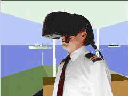
Getting the two images from different locations and directing the images to the according eye is known as the spatial separation method. This solution is realized among others by use of head mounted displays, HMD. In front of both eyes a liquid crystal display is positioned. One screen shows the right image, the other one the left. Those displays are still expensive and designed for specific applications, see Figure 2. A special quality against other techniques is that a person can move the head in any direction while viewing the image.
2.2 Temporal Separation
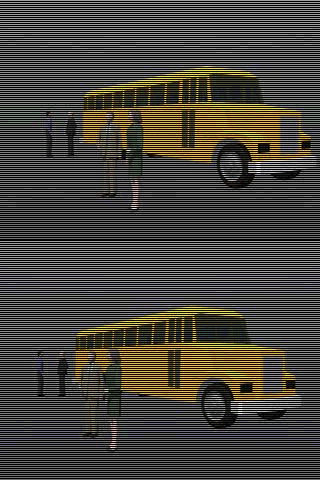
The most customary solution seems to be viewing the separate images with shutter glasses. The principle is that the two images are displayed on the same screen, changing between left and right with high frequency. The shutter glasses are working like a light switch, so that one eye only can see the according image, synchronized by the display frequency. Interlaced images are combined in one frame. The left image is stored in the rows with even numbers, the right image is store in the odd line numbers of the frame buffer. Only 50 % of each image is used. But since the vertical visual information is less important than the horizontal, this method works sufficiently. Figure 3 shows an interlaced stereo pair. The images can be viewed with a Web browser as animated GIFs to visualize the temporal image separation process. The vertical refresh rate of a monitor is usually the synchronization signal used to control liquid crystal shutter (LCS) glasses . The monitor should operate above 100 Hz vertical refresh rate at the intended viewing resolution. Suppliers of LCS glasses can be found for example by visiting the Web-sites www.vrjoy.com or www.stereographics.com.
The vertical refresh rate or image refresh rate is a value for the number of complete images displayed on a monitor in one second. Above 75 Hz there is no flickering. The horizontal refresh rate or line refresh rate is a value for the number of lines written in one second on the screen. It is the product of vertical refresh rate multiplied with the number of lines. Some extra lines for sync must be added to the resolution.
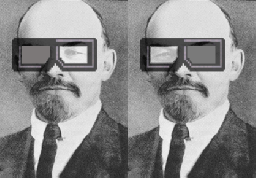
A better image quality will be reached if the hardware supports page flipping. In this case there is no loss of image information. The two images are complete stored in the frame buffer. Displaying works by alternation of the base address. Total3D from Canopus Corp. is a hardware that supports the described technique. Another method of using LCS glasses is sync doubling. The video signal between computer and monitor is interrupted with a special device. The vertical sync signal is doubled , the horizontal scanning rate stays unchanged. This allows to feed a left and right image in one image cycle. The software for this process compresses the vertical resolution to 1/2 of the normal size
2.3 Filtering
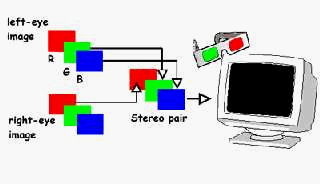
Viewing stereo pairs with color filter glasses red / green or red / blue is known as the anaglyph technique. Both images are coded with complementary colors and displayed together at the same location. There is a choice between colour anaglyphs and grayscale anaglyphs. Colour can cause some problems while grayscale will work in each case. The use of colour is recommended to make 2D displaying of the anaglyphs more interesting. The computer anaglyph process reduces the red color from the left image. From the right image the blue and green components are eliminated. The final image in RGB mode combines the red color from one image, while blue and green is filtered from the other image. The color filter glasses separate the images for the according eyes. Usually the red filter is used in front of the left eye, like the definition in politics. Some clipping has to be done for reducing the image to the stereoscopic window.
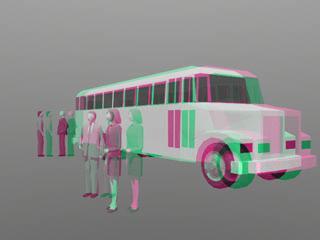
With an image processing software like Photo-Shop one can produce anaglyphs the following way. Load both images and convert them to grayscale and go back to RGB color mode. Activate the left image, Click on Windows, Show Channels. Select the red channel than select the whole image area with Select All and delete it. Activate the right-eye image, select the red channel, Select All and copy to the clipboard. Go back to the left-eye image and paste the clipboard content into the image. Now move the red channel about the stereo parallax in horizontal direction, view all channels with anaglyph glasses and adjust the parallax setting. Finally crop the image to the stereoscopic window and save it with no loss by compression.